
Visual Dolphin & Dolphin Horizon CAFM streamlines facilities management & maintenance. it gives a clear visibility to all the components you need to work with in your environment.. a user-friendly interface which equips you to plan, monitor and execute all your premises management tasks. it allows a complete coordination between the physical facilities & the human resources to optimize the functioning of your organization. With its integrated business intelligence tools & powerful mobile app , Visual Dolphin & Dolphin Horizon CAFM assists managers to improve every element of their business
It applies to the servicing of all types of properties & their assets (Villas, Residential Buildings, Malls, Manufacturing plants, machineries, pools, …). It integrates with Dolphin Equipment Management system & Preventive Maintenance Planning, Task Work Order (for Task assignment of technicians & time scheduling), JobDor mobile App for tracing the tasks, checking IN & OUT, Material consumption and clients billing.
Built-In CRM features for customer Contacts & Information, history of repairs by property or by asset, and, Direct Mail Sender to concerned persons. It includes advanced reporting on cost analysis, sales statistics and detailed analysis on client/ticket profitability.

Contract dealing with tenants / property owners details : usually, based on an annual retainer, it includes the agreement terms related to the various services to offer to the properties owners or developers: maintenance services in various area (civil, MEP, plumbing, landscaping, cleaning…), repairs, preventive maintenance and Security.
Cost estimation: It budgets for the various expected costs involved in order to fulfill the contract commitments, with respect to labor, material consumption and subcontracting.
Client billing: Based on multiple criteria including annual or monthly billing, “Cost Plus” on material spent, billing based on accomplished phases (for projects), Cost sharing across many residents or co-owners…
Built-In CRM: covering contact management & information, client’s history, direct mail sending to clients, statement of accounts & balances, visit reports, client brief per job including the requirements & scope of work, management of leads & opportunities.
Mobile Interface JobDor : The system have extension to an Android/iOS based mobile App, where the user will have the necessary functions to handle his assignments.
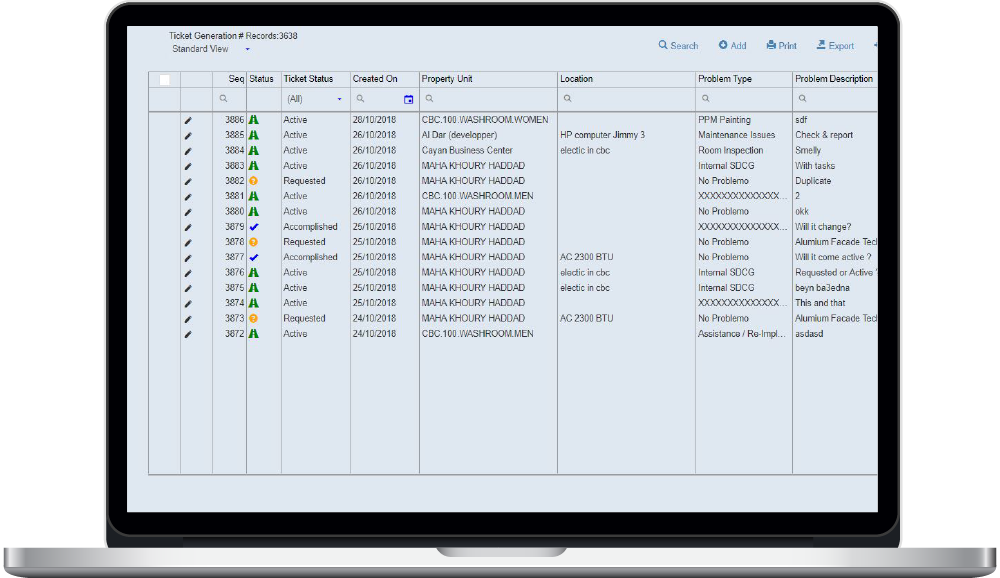
Tickets are used to effectively manage all maintenance works or incidents to be attended at a location involving the property or an asset within the facility.
Tickets are generated through a call center/ helpdesk recording complains on technical defects or based on certain conditions related to the periodical maintenance agreement such as imposed number of regular visits or related to preventive maintenance rules.
Ticket specifications: attachment of documents & pictures, workflow circulating the tickets based on the company’s processes (problem inspection, cost estimation, supply of material, supervisor assignment to a technician…), generation of quotations and client billing, cost calculation of a ticket based on the material consumption, time spent, and external purchases done, Alerts when tickets exceed time beyond the SLA.
The Task Work Order contributes to monitoring the assignment of Actions (TASKS) to be taken by the various resources, and scheduling in time depending on the scopes of specialization. The generation of Task Work Orders is based on a ticket related to a repair case or on a preventive maintenance scheduled and already due.
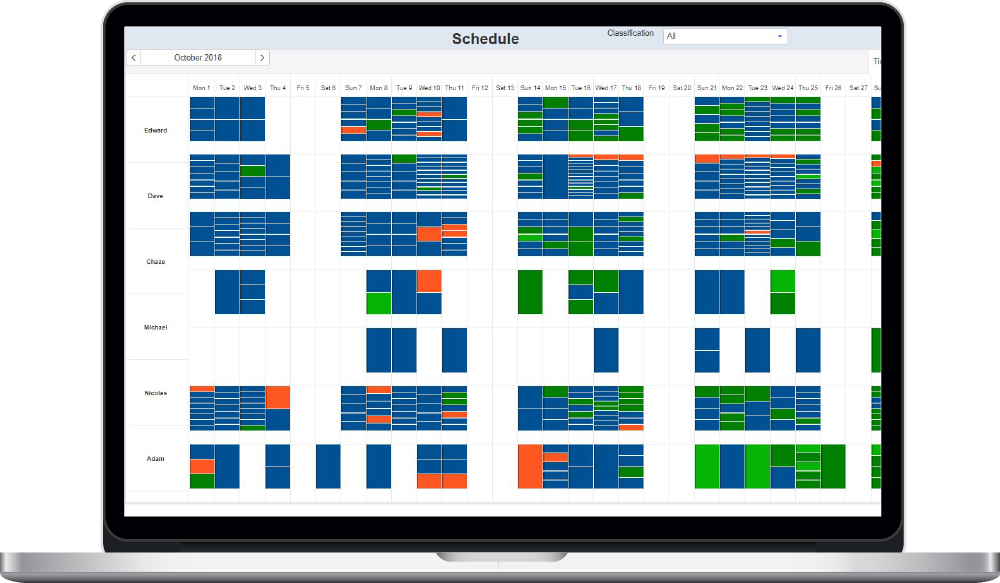
Tasks may be linked to a client, to a Ticket or, may be stand alone. Accessible from any web browser (Mac or PC) or from a JobDor mobile APP, a listing monitors the daily activities (TWO) assigned to specific Technicians or related to a client or to a problem type. Tasks are displayed in a calendar giving a better view on the work distribution between resources. When many technicians are involved, a friendly way to drag and drop tasks moving them between team members , or rescheduling them to another date or time.
The system issues alerts when tasks are outstanding for a certain period of time, or when the total time spent has exceeded the time estimate. Tasks may be put on hold (waiting for spare parts), cancelled or closed upon completion; these may be reassigned to other employees or rescheduled at another date or time. KPIs are for measuring the duration between the time of receiving a call, the time it is assigned to an employee and the time when completed.
TWO integrates with Dolphin Time Sheet module & JobDor Mobile App.
Dolphin PPM Keeps on top of what needs to be done with pre-planned preventive and repair maintenance alerts. It allows facilities to schedule and track regular maintenance and inspections on properties, equipment, utilities and assets. It helps preventing unexpected asset failure/breakdown and extend the life expectancy of the property or the equipment.
Dolphin PPM manages the regular maintenance to be conducted on each asset or property, based on specific frequencies (once every quarter, or 2 times a year…).
Accordingly, a planner will generate an annual calendar by creating the tickets & tasks needed when a preventive inspection needs to be performed. The ticket will include a list of properties to be tackled during the visit .
Dolphin PPM integrates with the checklist module, and with the Material Pick List/Material Consumption when spare parts or consumables are needed during the preventive inspection.
Automated maintenance alerts are provided on-screen or via e-mail to keep up on top of the prevention!