Built for complex business. Made refreshingly simple.Beirut Dubai Riyadh
Retail & point of sale. Connected to finance.

Dolphin Horizon
Retail

Sell Faster. Stock Smarter. Keep Customers Coming Back.

An all-in-one POS and retail solution for fast-paced, high-volume, multi-store operations. Touch-screen selling, advanced pricing and promotions, gift vouchers, loyalty and shift control at the till, with real-time stock across every outlet. Fully integrated with Dolphin Horizon accounting, stock and procurement.
4 CHAPTERS · 22 FEATURES · 4 DEPLOYMENT OPTIONS
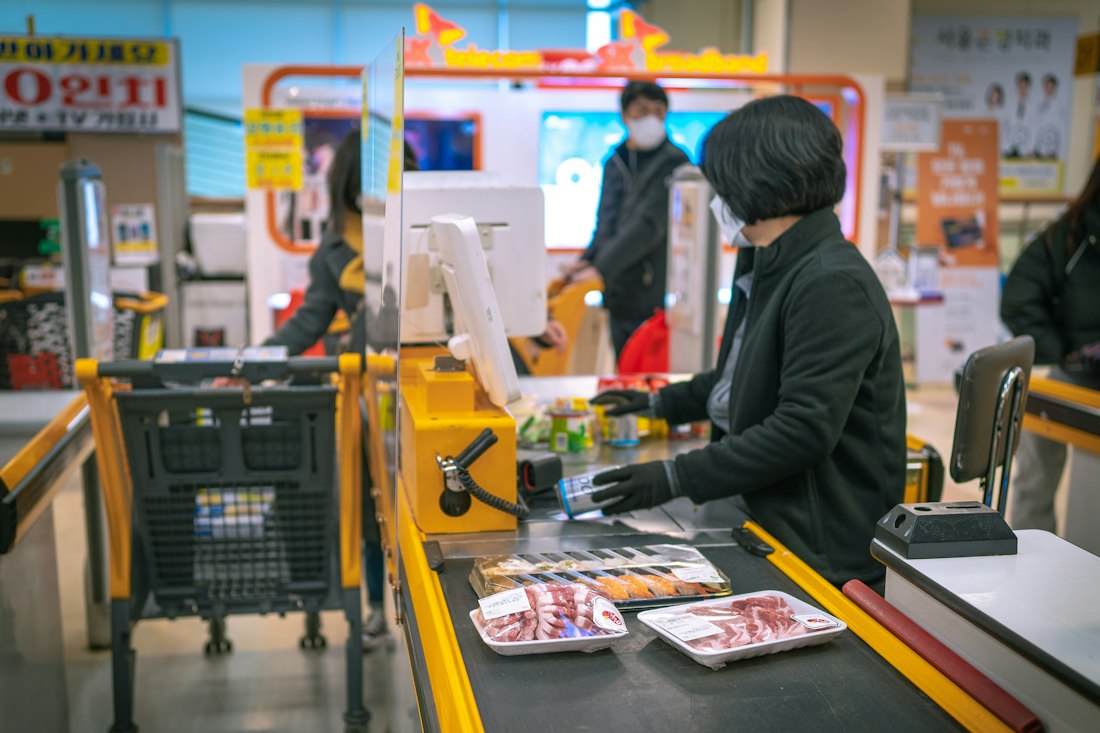
Cashier serving a customer at a supermarket checkout Every outlet, live
Head office to tillOne retail systemSales · stock · customers
Touch-screen POSFast checkout & shift control
Promotions & loyaltyPricing, vouchers & points
Multi-storeOnline, replicated or offline
Fully integrated ERPAccounting, stock & procurement
The brochure

Every Till, Every Store, Every Customer

Retail connects every till, every store and every customer to your back office. Read each chapter on this page, or download the brochure to share with your team.

Chapter 01

Point of Sale & Checkout

Fast, friendly checkout that keeps the queue moving.

  • Touch-screen operation
  • Any payment, any currency
  • Shift and cash control
  • Returns and pending sales
Chapter 02

Pricing, Promotions & Loyalty

Run any campaign, and know the customer behind every sale.

  • Price lists by store and channel
  • Buy X get Y and bundles
  • Vouchers and promo codes
  • Points and loyalty tiers
Chapter 03

Inventory & Merchandise

Stock on hand in every outlet, visible in one click.

  • Min/max replenishment
  • Size and colour matrix
  • Serial, lot and expiry tracking
  • Consignment and pre-booking
Chapter 04

Stores, Security & Integration

One system. One solution. One platform.

  • Accounting, stock and procurement
  • E-commerce and marketplaces
  • Group and field-level security
  • Four ways to connect stores

Download the Retail brochure (PDF) ↗

Business benefits

The Right Merchandise, at the Right Price, at the Right Time.

Successful retail is not just about the cash register. It takes one system that connects every till, every store and every customer to your back office.

01

Serve Customers Faster

A friendly touch-screen POS with single-keystroke actions frees your staff to do what they do best: sell.

02

Never Run Out, Never Overstock

Min/max levels, replenishment planning and one-click stock visibility keep every outlet supplied with the right items.

03

Turn Shoppers Into Regulars

Promotions, vouchers and loyalty points tied to a rich customer database bring customers back again and again.

04

See Every Store, Live

Sales, margins and stock for every outlet in real time, with end-of-day results in your inbox.

One connected workflow

From Supplier to Shopper

Every item, price and sale flows through one system, so head office and stores always work from the same information.

STEP 01

Buy & receive

Purchase orders, receiving and supplier prices are handled in Dolphin Horizon procurement and stock.

Procurement
STEP 02

Price & distribute

Approve prices and promotions at head office, then replenish each outlet from the warehouse.

Chapters 02–03
STEP 03

Sell & collect

Ring up sales on touch screens, apply promotions and loyalty, and collect any way the customer pays.

Chapter 01
STEP 04

Close & analyse

Close each shift, post sales to accounting automatically and review results on live dashboards.

Chapter 05

Collect payment any way your customers prefer

CashCredit cardsChequesGift vouchersCredit note vouchersLoyalty pointsSales on accountMulti-currency
Who it is for

Built for Retailers of Every Kind and Size

From a single store with one computer to a chain of outlets across cities and countries.

Fashion & Garments

Size and colour matrix, seasonal promotions and fast exchanges.

Electronics & Appliances

Serial numbers, warranties, repairs and deferred delivery of bulky items.

Furniture & Home

Display items, back-to-back orders and booking from another store.

Cosmetics & Beauty

Lot and expiry tracking, loyalty tiers and gift vouchers.

Bookstores & Specialty

Large catalogues, pre-booking of new launches and consignment stock.

Also flower shops, building materials and many other retail businesses.

Chapter 01 · Keep the queue moving.

Point of Sale
& Checkout

Fast, Friendly Checkout That Keeps the Queue Moving.

Every POS is configured for the way your store works, with the speed and control a busy retail floor demands.

  • Touch-screen operation
  • Customer lookup in seconds
  • Any payment, any currency
  • Shift and cash control
  • Clear return policies
  • Pending sales and quotations
CHAPTER 01 · TOUCH-SCREEN POS · PAYMENTS · SHIFTS
Point of Sale & Checkout — illustrative business photograph Chapter 01
Inside this chapter6 featuresCheckout · payments · shifts
1.1

At the Till

01
Touch-Screen POSBuilt for speed at the till.Single-keystroke and touch support for common operations such as completing a sale, payment, multi-currency collection and suspending a sale. Works with touch screens, bar-code readers, cash register functions and slip, dot matrix, thermal or roll printers.
02
Fast Customer LookupFind or add a customer in seconds.Attach a customer to the sale by name, phone number or email, by swiping their loyalty card, or by searching their birthday and month.
03
Payments, Currencies & CreditCollect any way the customer pays.Accept cash, cheques, cards, gift and credit note vouchers and loyalty points, in multiple currencies with user-defined exchange rates. Selected customers can buy on account, with credit control and balances updated across outlets.
1.2

Control & Service

04
Shift Management & End of DayEvery drawer counted, every shift accounted for.Define one or more shifts a day. Each invoice is assigned to a shift; closing counts the cash in each POS, opening records the float left in the drawer, and the daily sales report follows.
05
Returns & ExchangesYour return policy, applied consistently.Accept returns within a set period, against a specific invoice or as a simple replacement, and refund by credit note voucher instead of cash where your policy requires. Invoices can be printed or emailed to the customer.
06
Pending Sales & QuotationsNever block the queue.Put a sale on hold while a customer keeps shopping and serve the next one. Prepare quotations that don't touch stock or sales, then turn them into confirmed sales when the customer is ready.
End of chapter 01 · Point of Sale & CheckoutNext chapter: Pricing, Promotions & Loyalty
Chapter 02 · Campaigns and customers.

Pricing, Promotions
& Loyalty

Run Any Campaign, and Know the Customer Behind Every Sale.

Change prices and launch promotions instantly across all stores, for sidewalk sales, seasonal campaigns or special price scenarios.
  • Price lists by store and channel
  • Approved prices pushed to all stores
  • Buy X get Y and bundles
  • Vouchers and promo codes
  • Points and loyalty tiers
  • SMS to registered customers
CHAPTER 02 · PRICE LISTS · PROMOTIONS · VOUCHERS · LOYALTY
Pricing, Promotions & Loyalty — illustrative business photograph Chapter 02
Inside this chapter6 featuresPrices · promotions · loyalty
2.1

Pricing & Promotions

01
Advanced PricingThe right price for every store, season and customer.Define multiple price lists per location, period, client category (silver, platinum…) and sales channel (retail, export, distribution). Prices can be tax-inclusive or tax-exclusive, with VAT separated from revenue automatically.
02
Price & Discount ControlHead office sets the rules, stores follow them.Prepare, review and approve prices in advance, then push changes to all outlets at any time of day. Staff give discounts per line or per invoice only within the limits of their profile.
03
Promotions & DiscountsSimple markdowns to complex campaign formulas.Run initial-price markdowns, buy X get Y, quantity-based discounts and invoice-total offers, linked to SKUs, categories or brands, plus bundles and promotional kits.
2.2

Vouchers, Loyalty & Customers

04
Vouchers & Promo CodesEvery type of voucher, issued and redeemed under control.Manage gift vouchers and their redemption, import mall gift vouchers, issue cash back vouchers and promo codes with expiry dates, and record supplier rebates on specific products.
05
Loyalty ProgrammesReward your best customers your way.Set your own points calculation and redemption rules, double points for tiers during a period, link family members under one identity, and connect to third-party loyalty programmes through an API.
06
Customer Database & MessagingKnow your clientele, and keep in touch.Every sale enriches the customer database, so you can follow buying trends and target segments. Registered customers receive SMS messages about promotions and clearances.
End of chapter 02 · Pricing, Promotions & LoyaltyNext chapter: Inventory & Merchandise
Chapter 03 · The right stock in every store.

Inventory
& Merchandise

Stock on Hand in Every Outlet, Visible in One Click.

Plan replenishment, move goods between locations and handle every kind of item, from fashion sizes to serialised electronics.

  • Min/max replenishment
  • Transfers with approval workflow
  • Size and colour matrix
  • Serial, lot and expiry tracking
  • Units, kits and consignment
  • Pre-booking and deferred delivery
CHAPTER 03 · REPLENISHMENT · MATRIX · SERIALS · LOTS
Inventory & Merchandise — illustrative business photograph Chapter 03
Inside this chapter6 featuresReplenish · track · book
3.1

Replenishment & Variants

01
Smart ReplenishmentKeep every shelf stocked, without overstocking.Set min/max levels, view stock in all outlets in one grid and prepare transfers to each store. Outlet requests follow an approval workflow with the warehouse team.
02
Size & Colour MatrixMade for fashion and ready-to-wear.Manage quantities in a size and colour grid, based on size scales that follow international measurement standards.
03
Units, Kits & ConsignmentEvery kind of item, handled correctly.Use multiple units of measure with automatic conversion, sell kits and bundles, and manage consignment stock for both buying and selling.
3.2

Traceability & Customer Orders

04
Serial Numbers & WarrantyEvery unit traced from purchase to after-sales.Track serial numbers from purchase to sale for electronics and appliances, and handle repairs and warranties with Dolphin Service Center. See Service Center →
05
Lot, Batch & ExpirySell the right batch before it expires.Track lots, batches and expiry dates for perishable and regulated goods, and keep items under review out of sale until they are cleared.
06
Customer Orders & BookingsSell what's not on the shelf yet.Manage display items and back-to-back orders, pre-book newly launched items, book stock from another store and schedule deferred delivery for bulky items.
End of chapter 03 · Inventory & MerchandiseNext chapter: Stores, Security & Integration
Chapter 04 · One system. One platform.

Stores, Security
& Integration

One System. One Solution. One Platform.

Retail shares its data with your back office and the channels you sell through, so information is entered only once, and every store keeps selling whatever the connection.

  • Accounting, stock and procurement
  • E-commerce and marketplaces
  • CuantoDOR mobile app
  • Group and field-level security
  • Online, replicated or offline stores
  • Interfaces with third-party ERPs
CHAPTER 04 · ERP · E-COMMERCE · SECURITY · CONNECTED STORES
Stores, Security & Integration — illustrative business photograph Chapter 04
Inside this chapter4 features+ 4 deployment options
4.1

Integration & Security

01
Fully Integrated with Dolphin Horizon ERPAccounting, stock and procurement, all in one system.Retail is fully integrated with Dolphin Horizon accounting, stock and procurement, and with Dolphin Service Center. It can also interface with any third-party ERP system.
02
E-commerce & Third-Party IntegrationsSell everywhere, manage in one place.Connect with e-commerce platforms such as Noon and Amazon, custom websites, mall sales reporting solutions, third-party loyalty programmes and electronic shelf labels.
03
CuantoDOR Mobile AppStock availability in every salesperson's hand.Retail is integrated with CuantoDOR, the Dolphin mobile app that shows sales staff real-time product availability across all locations and prints labels.
04
Users & SecurityThe right privileges for every role.Group users by type of work and manage rights per group. Control POS fields such as selling options, client updates, default price list, payment modes and currency.
4.2

Deploy the Way Your Store Network Works

Option 01

Single Store

One computer or several tills in one store, sharing one database.

Fits: independent shops
Option 02

Fully Online

Outlets work directly on the head office server over a wide area network.

Fits: chains with reliable connectivity
Option 03

Data Replication

Each outlet runs its own database, synchronised with head office automatically.

Fits: multi-site and multi-country chains
Option 04

Import & Export

Data is exchanged between locations by file where no network coverage is available.

Fits: remote or temporary outlets
End of chapter 04 · Stores, Security & IntegrationNext: Reports & dashboards
Chapter 05 · Reports, dashboards & alerts

Rich Insight Into Every Store, Item and Customer

Interactive dashboards, custom KPIs and a complete set of reports turn every transaction into clear answers, for each till and across the whole chain.

01

Sales Performance

Analyse sales by store, POS, shift, hour, day, item, brand and category, compare periods and spot what sells where and when.

02

Profitability & Margins

Follow sales profit by POS, store, item and brand, and see how pricing, discounts and promotions shape your margins.

03

Cash & Daily Control

Control daily takings, shift closings, payment modes and invoices by POS, with end-of-day sales results for every store.

04

Inventory & Replenishment

Follow stock on hand by location and POS, stock below minimum, near-expiry products and the items each outlet needs next.

05

Customers & Loyalty

Understand who your customers are and what they buy, follow loyalty points and vouchers, and keep an eye on outstanding balances.

06

Dashboards & Alerts

Real-time interactive dashboards with custom KPIs and drill-down, plus automatic end-of-day emails on sales across all stores, expiring stock, minimum level breaches and customer credit limits.

Filter and group any report by store, POS, item, brand, customer or period, and export the results to Excel, RTF or ASCII.

Why Dolphin Horizon

Built by People Who Understand Retail

Software Design has been building financial and business management systems since 1985. Our consultants bring proven retail practices to every implementation, so your stores get up and running quickly and use the system the way it was designed.

Fully integrated ERP

Retail is fully integrated with Dolphin Horizon accounting, stock and procurement, so nothing is keyed in twice.

Popular hardware

Runs on pre-configured hardware from the most popular manufacturers, with new devices supported as they appear.

Always evolving

Continually improved and developed to keep pace with the needs of the retail sector.

Secure by design

User groups, privileges and field-level controls at the POS keep every role within its limits.

Standalone POS vs one system

Why Retailers Move Off Standalone Tills

When the tills, the warehouse and accounting don't talk to each other, stock runs out, promotions leak margin and month-end takes days.

Standalone cash registers

Every store, its own island

  • Stock levels known only after a manual count
  • Prices and promotions updated store by store
  • Vouchers and loyalty tracked on paper or separate tools
  • Sales re-keyed into accounting
  • Results known only after the month closes
Visual Dolphin & Dolphin Horizon

One centralised system

  • Stock on hand in every outlet, in real time
  • Prices and promotions pushed from head office instantly
  • Vouchers, points and customers managed in one place
  • Fully integrated with accounting, stock and procurement
  • End-of-day results in your inbox, every day
Frequently asked questions

Questions Retailers Ask

More detail on how Visual Dolphin and Dolphin Horizon Retail support retail operations.

What types of retailers is Visual Dolphin and Dolphin Horizon Retail designed for?

It suits fast-paced, high-volume, multi-site retailers of all kinds: fashion and garments, electronics and home appliances, furniture, cosmetics, bookstores, flower shops, building materials and many others, from a single store to a large chain.

Is Retail available on both Visual Dolphin and Dolphin Horizon?

Yes. Retail is available for both Visual Dolphin and Dolphin Horizon, so you can run it on the Dolphin platform your organisation uses.

Is the retail POS integrated with accounting, stock and procurement?

Yes. Retail is fully integrated with Dolphin Horizon accounting, stock and procurement, so information is entered only once. It is also integrated with Dolphin Service Center for repairs and warranties, and can interface with any third-party ERP system.

Can our stores keep selling if the network goes down?

Yes. Stores can work fully online with the head office server, synchronise through data replication, or exchange data by import and export where no network coverage is available.

What kinds of promotions can we run?

Simple discounted prices, buy X get Y, quantity-based discounts, invoice total offers, bundles and kits, linked to SKUs, categories or brands, plus gift vouchers, cash back vouchers and promo codes with expiry dates. Price lists can also differ by location, period, client category and sales channel.

Does it support loyalty programmes?

Yes. You can define your own points calculation and redemption rules, give tiers such as silver customers double points for a period, and connect to third-party loyalty programmes through an API, including redemption as a payment mode.

Which POS hardware is supported?

Touch screens, standard cash register functions, bar-code readers and slip, dot matrix, thermal or roll printers from the most popular hardware manufacturers. Support is added as new hardware becomes available.

Can we sell online and on marketplaces?

Retail integrates with e-commerce platforms such as Noon and Amazon, custom websites, mall sales reporting solutions, third-party loyalty programmes and electronic shelf labels.

Can reports be exported?

Yes. Report data can be exported to Excel, RTF or ASCII files for further analysis.

LET'S BUILD WHAT'S NEXT

Connect every till, store
and customer.

Tell us how your stores sell, price and replenish. We’ll show you how Dolphin Horizon Retail connects your outlets to accounting and stock.

Request a demo Local experts. Long-term partnership.
↑
