Built for complex business. Made refreshingly simple.Beirut Dubai Riyadh
Mobile sales & distribution. Connected to finance.

Dolphin Horizon
SellDOR

Run Your Business on the Road.

A native mobile sales platform for brands, wholesale distributors and trading companies. Plan routes, visit customers, take orders, run cash van sales and collect payments on the spot, online or completely offline, on iOS and Android. Fully integrated with Dolphin Horizon accounting, stock and procurement, or run standalone alongside your own ERP.

IOS & ANDROID · ONLINE & OFFLINE · VAT COMPLIANT IN THE GCC
Van salesman smiling from the driver seat of a white delivery van Real time from the road
Mobility · speed · agilitySales on the moveRoutes · orders · collections
Pre-sales & cash vanOrders, invoices & receipts
Routes & check-insLocation tracking on every visit
Online & offlineNative app on iOS & Android
Fully integrated ERPAccounting, stock & procurement
The brochure

From the Morning Route to the Evening Sync

SellDOR combines customer information, pre-sales, cash van operations, routing, catalog, pricing, promotions and van inventory in one mobile app. Read each chapter on this page.

Chapter 01

Routes, Visits & Customers

The right customer, at the right time, with the full picture.

  • Daily route planning
  • Check-in and check-out by location
  • Lead and client management
  • Balances and outstanding invoices
Chapter 02

Catalog, Orders & Cash Van

Sell, invoice and collect while standing in the store.

  • Catalog with pictures and filters
  • Prices, discounts and promotions
  • Orders, invoices and receipts
  • Print or email on the spot
Chapter 03

Van Stock, Approvals & Offline

Keep the van stocked and the orders moving.

  • Van inventory and transfers
  • Sales order approval workflow
  • Complete offline mode
  • Sync during or at end of day
Chapter 04

Customer App & Back Office

Let customers order, and run it all from the office.

  • Customer ordering profile
  • Your company in their pocket
  • Back-office administration
  • Integrated or standalone
Business benefits

Improve Distribution. Increase Sales. Speed Up Ordering.

SellDOR solves the challenges every trading and distribution company faces with paper order books and traditional devices.

01

Empower Your Sales Force

Customer history, stock, prices and promotions in every salesman's hand, at every visit.

02

No Paperwork

Orders, invoices, receipts and returns are entered on the device and printed or emailed on the spot.

03

Direct Access to Information

Balances, outstanding invoices, credit limits and sales statistics, available in the field.

04

Immediate Order Processing

Orders reach the back office instantly, so they are approved, prepared and delivered faster.

One connected workflow

From Back Office to Customer and Back

The office prepares the day, the field executes it, and every transaction comes straight back to the system.

STEP 01

Prepare

The back office plans routes, price lists, promotions and visit types, and each salesman receives the day's data in the morning.

Chapter 04
STEP 02

Visit

The salesman follows the route, checks in at each customer and sees their balance, history and open orders.

Chapter 01
STEP 03

Sell & collect

Take the order or deliver from the van, invoice, collect payment and print or email the documents on the spot.

Chapter 02
STEP 04

Sync & review

Transactions sync to the back office, orders go through approval and managers follow the day on live dashboards.

Chapters 03 & 05

One app for every sales and delivery scenario

Sales ordersVan salesDirect salesHome & office deliveryConsignmentReturnsStock transfersPayment collection
Who it is for

Built for Brands and Distributors on the Move

For any business trading, retailing or taking orders away from the office, with salesmen, drivers or customers ordering by themselves.

Wholesale Distributors

Pre-sales teams and cash vans covering hundreds of outlets a day.

Brands & Principals

Field teams presenting the catalog, promotions and new launches.

FMCG & Food

Fast-moving goods with lots, expiry dates and free quantities.

Home & Office Delivery

Drivers delivering, invoicing and collecting at the customer's door.

Online B2B Ordering

Trade customers placing their own orders from their phone.

Chapter 01 · Every visit counts.

Routes, Visits
& Customers

The Right Customer, at the Right Time, With the Full Picture.

Salesmen and cash van drivers follow the day's route, check in at each customer and see everything they need before they open the order: contacts, location, balance, overdue invoices and loyalty points.

  • Daily routes in visit order
  • Check-in and check-out with GPS
  • Visit notes and skip reasons
  • Contacts, addresses and phones
  • Credit limit and balance
  • Outstanding and overdue invoices
CHAPTER 01 · ROUTES · CHECK-IN · CUSTOMERS · ACCOUNTS
Routes, Visits & Customers — illustrative business photograph Chapter 01
Inside this chapter6 featuresRoutes · visits · accounts
1.1

Routes & Visits

01
Salesman Route PlanningToday's customers, in the right order.Salesmen and cash van drivers follow daily itineraries drawn as a sequence of scheduled stops. Fixed and flexible routes are defined in the Visual Dolphin and Dolphin Horizon routing module, and customers appear sorted by route order.
02
Check-In, Check-Out & LocationKnow who visited whom, when and where.Each visit is checked in on arrival and checked out on departure. The location is captured both times and matched with the customer's GPS coordinates, then saved in the back office with the time.
03
Visit Notes & Skip ReasonsEvery visit reported, even the missed ones.Salesmen record notes with date, time, type, reason and time spent, or the reason a customer could not be served. Visit reports reach the concerned managers immediately.
1.2

Customers & Accounts

04
Lead & Client ManagementA full view of every lead and customer.View and update addresses, phone numbers, contact persons and their positions, conversation history and status (idle, lead or customer), and save GPS coordinates or view the customer on the map.
05
Account ManagementCollect with the right numbers in hand.Check the credit limit, balance, statement of account, outstanding invoices, overdue invoices based on today's date, and advance payments not yet allocated, before taking the next order.
06
Loyalty PointsReward balances at a glance.See the customer's loyalty points by card, so salesmen can mention them and apply the right benefits during the visit.
End of chapter 01 · Routes, Visits & CustomersNext chapter: Catalog, Orders & Cash Van
Chapter 02 · Sell, invoice and collect on the spot.

Catalog, Orders
& Cash Van

The Best Catalog for Your Goods, and the Fastest Order Book.

Find any item in seconds, see its price, stock and promotions, fill the basket and save. The company's rules are checked automatically, and the order, invoice or receipt is printed or emailed before the salesman leaves.

  • Search by code, barcode, family or brand
  • Pictures, stock and item history
  • Special prices and promotions
  • Credit limit and discount checks
  • Orders, invoices, returns, receipts
  • Wi-Fi or Bluetooth printing
CHAPTER 02 · CATALOG · PRICING · ORDERS · CASH VAN
Catalog, Orders & Cash Van — illustrative business photograph Chapter 02
Inside this chapter6 featuresCatalog · basket · cash van
2.1

Catalog & Pricing

01
Products CatalogYour goods, with pictures, in every hand.Search items by code, barcode, family, brand, type, description or promotion, with a picture next to each one, making SellDOR the best catalog for displaying the company's goods.
02
Complete Item DetailsEverything about the item before it goes in the basket.See the base or special price, available quantity, discount, code, barcode, full description, specifications, lot and expiry, the history of sales to this customer, and equivalent items when it is out of stock.
03
Prices, Discounts & PromotionsThe right deal for every customer.Apply special price lists per customer, discounts by customer category, loyalty membership or season, free quantities and promotions set in the back office, with previous selling prices in view.
2.2

Orders & Cash Van

04
Smart BasketCompany rules applied before saving.On saving, SellDOR checks the customer's special price list, available quantity, maximum discount, promotions, credit limit and right to free quantities, as set in the back office.
05
Every Transaction on the SpotPre-sales and cash van in one app.Register sales orders, invoices, receipts with various payment modes, returns and return requests, consignment sales and returns, invoice replacements and sales notes at the customer's site.
06
Print, Email & VATProfessional documents, compliant in the GCC.Print invoices, orders, receipts and returns on Wi-Fi or Bluetooth printers, or email them to the customer on the spot. SellDOR is fully compliant with VAT regulations in the GCC.
End of chapter 02 · Catalog, Orders & Cash VanNext chapter: Van Stock, Approvals & Offline
Chapter 03 · No signal, no problem.

Van Stock, Approvals
& Offline

Keep the Van Stocked and the Orders Moving.

Request goods from the warehouse or another salesman, move stock between warehouses, and send orders through their approval workflow. When the network drops, keep working offline and sync later.
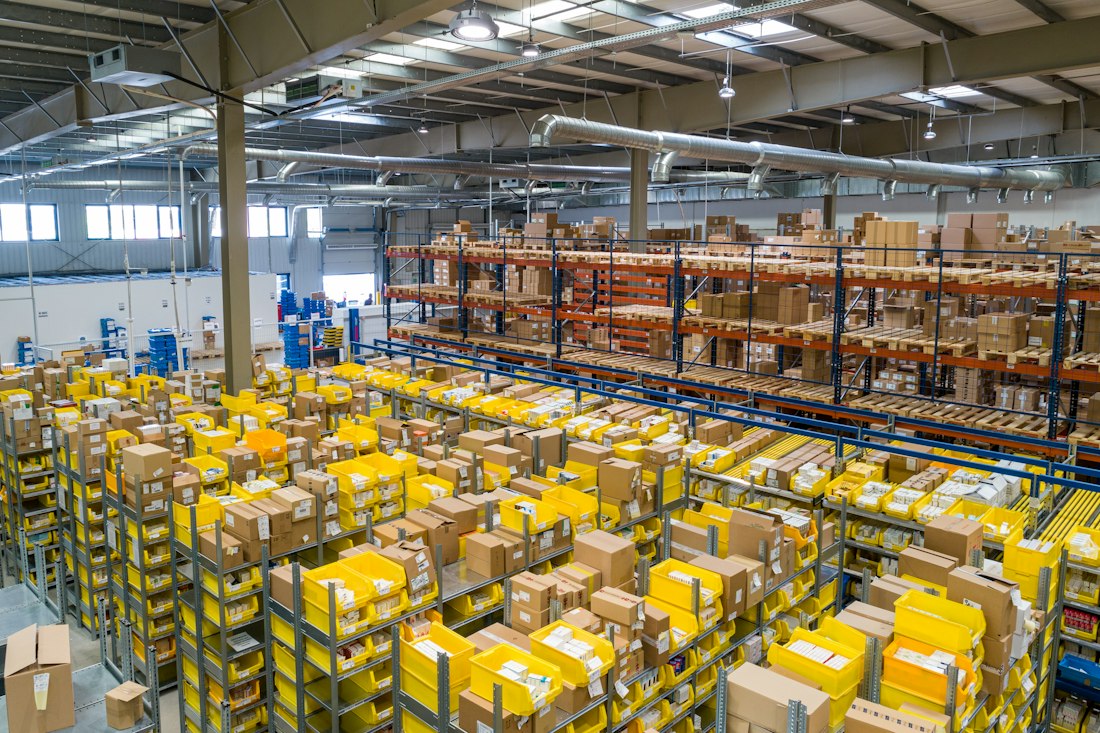
  • Van inventory management
  • Transfer requests and transfers
  • Sales order approval workflow
  • Assign orders to users
  • Complete offline mode
  • Sync at any time of day
CHAPTER 03 · VAN STOCK · TRANSFERS · APPROVALS · OFFLINE
Van Stock, Approvals & Offline — illustrative business photograph Chapter 03
Inside this chapter4 features+ 4 online & offline modes
3.1

Van Stock & Transfers

01
Van Inventory ManagementKnow what is on the truck at all times.Each van works as its own warehouse, with quantities updated by every invoice, return and transfer, so drivers always sell what they actually carry.
02
Transfer Requests & TransfersRestock without driving back blind.Request items from the main warehouse or from other salesmen, transfer stock between warehouses in real time, or send a transfer out that the other side confirms with a transfer in.
3.2

Approvals

03
Sales Order Approval WorkflowQuick decisions, from anywhere.Sales orders follow a user-defined workflow. Managers review the order, move it to the next step and assign it to a user, so approval is fast and every order's status is clear.
04
Order Follow-UpEvery order, at every step.Review orders grouped by workflow step with their totals, open any order to see its items, reprint it or email a copy, or cancel it if it has not been processed yet.
3.3

Online or Offline, All Day

Mode 01

Fully Online

Transactions are saved on the company server the moment they are entered.

Fits: city routes with good coverage
Mode 02

Morning Preparation

Salesmen receive up-to-date stock, customers, prices, discounts and promotions before they leave.

Fits: every route, every morning
Mode 03

Complete Offline

Business data is stored on the device, so salesmen can work all day without an internet connection.

Fits: remote areas and basements
Mode 04

Sync Anytime

Offline work is sent to the back office during the day or at the end of it, and reflects directly in the main data.

Fits: switching freely during the day
End of chapter 03 · Van Stock, Approvals & OfflineNext chapter: Customer App & Back Office
Chapter 04 · Two profiles. One platform.

Customer App
& Back Office

Let Customers Order, and Run It All From the Office.

The same app serves your salesmen and your customers. Customers sign in with their own profile to order, follow their orders and check their account, while the back office sets the rules and watches the field in real time.

  • Customer ordering profile
  • Orders straight to the back office
  • Company profile, services and news
  • Users, routes, prices and promotions
  • Real-time follow-up by location
  • Integrated or standalone
CHAPTER 04 · CUSTOMER PROFILE · SHOWCASE · BACK OFFICE · ERP
Customer App & Back Office — illustrative business photograph Chapter 04
Inside this chapter6 featuresCustomers · office · ERP
4.1

For Your Customers

01
Customer Ordering ProfileCustomers place their own orders.Customers sign in with a specific profile to browse the catalog and fill in their orders, which are registered directly in the back office. They can also update their contacts, phone numbers and addresses.
02
Customer Self-Service InquiriesFewer calls to your office.Customers follow their orders by workflow step, their return requests, outstanding and overdue invoices, balance, transaction lists and sales statistics, with the top ten transactions and graphs.
03
Your Company in Their PocketA portable website for your customers.Present your company profile, team and pictures, a services and brochure catalog with sub-services, pictures and documents, news and events such as new products and promotions, and links to your website and social media.
4.2

Back Office & Integration

04
Back-Office AdministrationThe office sets the rules, the field follows.Administer users, plan routes, define price lists and visit types, create promotions, customize the app's content, and follow mobile users' activities in real time by location and sales notes.
05
Fully Integrated with Dolphin Horizon ERPAccounting, stock and procurement, all in one system.SellDOR is fully integrated with Visual Dolphin and Dolphin Horizon accounting, stock and procurement, so orders, invoices, receipts and transfers post without re-keying. It can also run standalone, interfaced with your own ERP.
06
Native App on iOS & AndroidOne app, every device.A native, cross-platform mobile application that runs on Apple and Android phones and tablets, with fast touch-screen navigation made for use in the field.
End of chapter 04 · Customer App & Back OfficeNext: Reports & dashboards
Chapter 05 · Reports & dashboards

The Day on the Road, in Real Time

Summary and detailed views with graphs on sales, orders and collections over any period, with drill-down to the transaction itself, on the phone and in the back office.

01

Today's Activities

Visits, invoices, sales orders, returns, consignments, transfers, receipts and collections for the day, by salesman.

02

Sales & Collection Statistics

Sales, sales orders and collections by year, month, week and today, grouped by family, brand, type or item.

03

Visits & Routes

Customers visited, not visited and out of route, check-in history and time spent, for every salesman.

04

Customer Accounts

Balances, statements, outstanding and overdue invoices, and the history of each customer's purchases.

05

Top 10 & Listings

Top ten customers, items or transactions by amount, with transaction listings and the products catalog.

06

Dashboards

Dolphin BI dashboards on closing day, global sales, customers, monthly sales and KPIs, in line, bar or pie charts.

Every statistic drills down from the period total to the transaction itself.

Why Dolphin Horizon

Built by People Who Understand Distribution

Software Design has been building financial and business management systems since 1985, for trading and industrial firms across the Middle East and North Africa. SellDOR brings that experience to your sales force on the road.

Integrated or standalone

Fully integrated with Dolphin Horizon accounting, stock and procurement, or interfaced with your own ERP.

Works without signal

Complete offline mode with synchronization during or at the end of the day.

VAT compliant

Fully compliant with VAT regulations in the GCC.

Part of the DOR family

Alongside JobDOR and FillDOR, the Dolphin mobile apps.

Paper order books vs one app

Why Distributors Move Off Paper and Phone Orders

When orders are written on paper and phoned in at night, stock is wrong, prices are wrong and the office learns about the day only the next morning.

Paper, phone & traditional devices

The office is always a day behind

  • Orders re-typed in the office, with errors
  • No view of stock, prices or promotions at the customer
  • Credit limits checked after the goods are delivered
  • No proof of which customers were visited
  • Results known only the next morning
Visual Dolphin & Dolphin Horizon SellDOR

Real time from the road

  • Orders and invoices saved straight to the back office
  • Stock, special prices and promotions in every hand
  • Credit limit and discount checked before saving
  • Check-in and check-out by location on every visit
  • Today's activities on a live dashboard
Frequently asked questions

Questions Sales Managers Ask

More detail on SellDOR, the Visual Dolphin and Dolphin Horizon mobile sales app.

What is SellDOR?

SellDOR is a multi-purpose native mobile app for brands, wholesale distributors and trading companies. It combines customer information, pre-sales, cash van operations, route planning, location tracking, the product catalog, pricing, promotions and van inventory in one app.

Which operations does SellDOR cover?

Sales orders, van sales, direct sales, home and office delivery, invoices, receipts, returns and return requests, consignment sales, stock transfers and payment collection.

Does SellDOR work without an internet connection?

Yes. Business data is stored on the device, so salesmen can work completely offline all day and sync their transactions to the back office during the day or at the end of it. They can switch between online and offline mode at any time.

Is SellDOR integrated with Visual Dolphin and Dolphin Horizon?

Yes. SellDOR is fully integrated with Visual Dolphin and Dolphin Horizon accounting, stock and procurement. It can also run standalone, with only the main data created in its back office, and be interfaced with your own ERP.

Can our customers use SellDOR to order?

Yes. Customers sign in with a specific profile to place their orders, which are registered directly in the back office, and to follow their orders, outstanding invoices, balance and statistics.

Which devices does SellDOR run on?

SellDOR is a native cross-platform app that runs on Apple iOS and Android phones and tablets, and prints on Wi-Fi or Bluetooth printers.

Is SellDOR VAT compliant?

Yes. SellDOR is fully compliant with VAT regulations in the GCC.

How do managers follow the sales team?

Check-ins and check-outs record each visit's time and location, visit notes reach managers immediately, and the Today's Activities and statistics dashboards show visits, sales, orders and collections in real time.

Brochures

Download the Details

LET'S BUILD WHAT'S NEXT

Complex operations.
Clearer possibilities.

Tell us what your business needs. We'll show you how Dolphin can help connect the pieces.

Request a demo Local experts. Long-term partnership.
↑
